Amazon ads agency for D2C brands in India
We run Amazon ads for Indian D2C brands with each bid set against the product's margin. That covers Sponsored Products, Sponsored Brands and display ads, the listings they send shoppers to, and a weekly read of the search term report. You see ACOS and TACOS per product, and what the account earns after ad spend.
Works best for brands already selling on Amazon.in, with a few products that sell steadily and a monthly ad budget they want to see profit from, whether they run ads themselves today or through another agency.
FROM AMAZON ADS' OWN GUIDES TO SPONSORED PRODUCTS AND SPONSORED BRANDS, READ 27 NOVEMBER 2026. SOURCES AT THE FOOT OF THE PAGE.
Amazon ad types in India and when we use each
Amazon advertising in India comes in four main types. Most D2C brands should put the bulk of their budget into Sponsored Products first and add the others as products prove they can sell profitably.
| What it does | How you pay | Who can use it | When we use it | |
|---|---|---|---|---|
| Sponsored Products | Promotes a single product in shopping results and on product pages, and takes the shopper straight to its detail page | Cost per click, with no monthly or upfront fee | Professional sellers, vendors and agencies. The product needs the Featured Offer and must be in stock. | From the first week, for most of the budget |
| Sponsored Brands | Shows your logo, a headline or video and several products at the top of search results and on product pages | Cost per click, cost per 1,000 viewable impressions, or a fixed price to reserve top of search on your brand keywords | Sellers enrolled in Amazon Brand Registry, vendors and agencies | Once two or three products sell steadily, to protect brand searches and send shoppers to your Brand Store |
| Display ads | Reaches shoppers on and off Amazon, including people who viewed your products and didn't buy | Set per campaign in Amazon Ads Agent, depending on the goal | We check eligibility in your account before planning it | From month three, to bring back product viewers |
| Amazon DSP and streaming TV | Programmatic display, video and streaming TV ads, including Prime Video, using Amazon's shopping audiences | Self-service or managed by Amazon; Amazon's managed services have budget minimums | Advertisers whether or not they sell on Amazon | Later, for brands with profitable sponsored ads and a reason to build reach |
Amazon now calls Sponsored Display "display ads" and runs it in Amazon Ads Agent, the platform that brings sponsored ads and Amazon DSP into one place. Existing Sponsored Display campaigns keep running.
How we manage Amazon PPC in the first 90 days
Amazon says new campaigns tend to have a high ACOS, so we plan the first three months in stages. The listings come before the ads, and new ad types come only once the core campaigns make money.
- WEEK 1
Audit the account
Your search term, placement and advertised product reports for the last 60 to 90 days, with spend split by product and match type, set against the margin on every product.
- WEEKS 1–2
Fix the listings we'll advertise
The Featured Offer and stock, a clear title of about 60 characters, four or more zoomable images, at least three bullet points and A+ content where you have Brand Registry.
- WEEKS 2–3
Rebuild the campaign structure
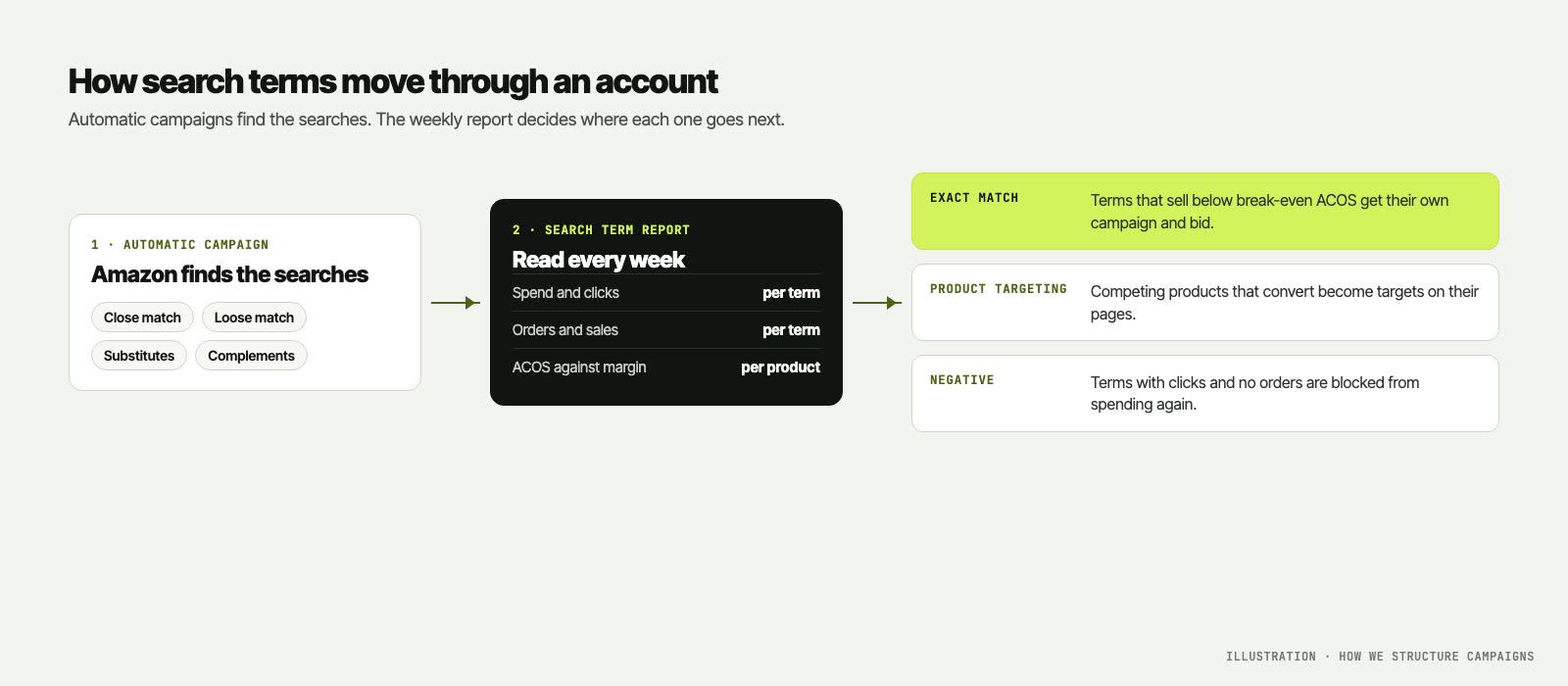
Automatic campaigns to find searches, manual exact and phrase campaigns for terms that already sell, product targeting on competing listings, and negative keywords from the start.
- WEEKS 3–4
Set bids against margin
Each product gets a target ACOS below its break-even, with dynamic bids, and placement adjustments where top of search converts better.
- MONTH 2
Add Sponsored Brands and your Brand Store
Your brand keywords protected, video ads for your main products, and a Brand Store that shows the whole range.
- MONTH 3 ON
Retarget and widen
Display ads for shoppers who viewed your products, and new keywords and products added from the search term report each week.
We track these three numbers every week.
- ACOS against break-even, by product
- A 30% ACOS is profitable on a product with a 40% margin and loses money on one with 25%. One target for the whole account hides that.
- TACOS
- Ad spend as a share of all your Amazon sales, organic and paid. If it falls while total sales grow, the ads are lifting the whole account.
- New-to-brand orders
- Orders from shoppers buying your brand on Amazon for the first time, from Amazon's own reports. It shows whether ads find new buyers or just catch existing ones.
What we need before we start
Most of this is already in Seller Central. Your margin per product matters most, because every bid is set from it.
Data and access
- Seller Central or Vendor Central accesswith advertising permissions, added as a user so you keep control
- Your Amazon Brand Registry statusneeded for Sponsored Brands and, for sellers, A+ content
- Margin per product after Amazon's feesselling price, product and packaging cost, referral, closing and fulfilment fees
- Stock levels and reorder datesads stop serving when a product is out of stock
- Listing images, videos and A+ content
- Your sale calendarGreat Indian Festival, Prime Day and your own launches
Where Amazon ad budgets leak
- Automatic campaigns left running aloneThey find good searches and spend on poor ones too, until someone reads the report.
- No negative keywordsThe same unprofitable searches keep spending every week.
- One ACOS target for every productIt underspends on high-margin products and overspends on thin ones.
- Advertising weak listingsFew reviews, poor images or no Featured Offer turn paid clicks into lost money.
- Bidding on your brand name without checkingSometimes it's needed to block competitors. Sometimes it pays for sales you'd get anyway.
- Judging ads on ACOS aloneAn account can hit its ACOS target while total sales fall.

Break-even ACOS and what your Amazon ads earn
Amazon itself says there's no single good ACOS, and that ACOS has to sit below your profit margin for ads to make money. These are the numbers we use, and a calculator to work out yours.
| Metric | What it is |
|---|---|
| ACOS | Ad spend ÷ ad sales × 100. ₹50 spent for ₹100 of sales is a 50% ACOS.Amazon Ads ACOS guide |
| ROAS | Ad sales ÷ ad spend, the inverse of ACOS. A 50% ACOS is a ROAS of 2.Amazon Ads ACOS guide |
| Break-even ACOS | Your profit margin before ads. Above it, each ad sale loses money.Amazon Ads ACOS guide |
| TACOS | Ad spend ÷ all Amazon sales, organic and paidIndustry term, not an Amazon report |
| Cost per click | Total spend ÷ clicks. You bid a maximum and never pay more than your adjusted bid.Amazon Ads Sponsored Products guide |
| New-to-brand orders | Ad-attributed orders from first-time buyers of your brand on AmazonAmazon Ads Sponsored Products guide |
| Daily budget | Spent over a calendar month, and not paced through the day, so a small budget can run out in minutesAmazon Ads Sponsored Products page |
Work out your break-even ACOS and TACOS
The numbers filled in are examples for one product. Use prices without GST, and your fees from Seller Central.
Returns, storage fees and GST aren't included, so check the result against your Seller Central payments report. This is a planning tool, worked out for one product's margin.
What our Amazon ads management includes
Amazon marketing services cover a lot of ground. We focus on the parts that decide whether ads make money, and report on them by product.
Amazon keyword research
Search terms from your own reports, competitor listings and Amazon's suggestions, grouped by product and intent, with the ones worth bidding on marked.
Campaign build and structure
Automatic, keyword and product targeting campaigns set up so every search term can be traced to one place, with negatives in place from the first day.
Bid and budget management
Bids set against each product's break-even ACOS and reviewed every week, with budgets moved to the products and placements that earn the most.
Amazon listing optimisation
Titles, bullet points, images and A+ content on the products we advertise, so paid clicks land on a listing that converts.
Sponsored Brands video and Brand Store
Short product videos and a Brand Store that groups your range. Our ad creative testing work feeds the videos.
Weekly reporting by product
ACOS against break-even, TACOS, new-to-brand orders and organic rank on your main keywords, with the changes made that week.
How we read the search term report
The search term report lists the searches that led to at least one click on your ads. It's where most wasted spend shows up, so we go through it every week and sort each term into one of four actions.
- KEEP
Terms that bring orders below the product's break-even ACOS move into an exact match campaign with their own bid.
- CUT
Terms that have spent roughly the product's price with no order become negative keywords, so they stop spending.
- PROTECT
Searches for your brand name get Sponsored Brands coverage where competitors bid on them, and are left to organic results where they don't.
- MOVE
The placement report shows whether top of search, the rest of search or product pages convert best, and bid adjustments follow it.
How we judge it. ACOS by product against break-even, and TACOS for the account, week on week. If ad sales rise and total sales don't, we look again at what the ads are buying.

Mistakes we see often
- Setting one ACOS target for the accountMargins differ by product. Work out break-even ACOS for each one and bid to it.
- Running automatic campaigns with no follow-upThey're for finding searches. Without a weekly read of the search term report, they keep paying for the bad ones.
- Advertising products that aren't readyA listing with few reviews, weak images or no Featured Offer wastes the click you paid for.
- Pausing ads during a sale to save moneySale days are when shoppers search most. Plan budgets for them in advance.
- Daily budgets that run out by noonAmazon doesn't pace daily budgets through the day. If a campaign runs dry early, it misses the evening shoppers.
- Bidding on broad one-word searchesThey bring clicks and few orders. Start with longer searches that describe the product.
- Judging the account on ACOS aloneWatch TACOS and total sales too, or you may cut ads that were lifting organic sales.
- Letting stock run outAds stop when a product goes out of stock, and so do the sales they were bringing in. Plan stock around your ad pushes.
How we work together
We agree a fixed fee before we start. Your ad spend is paid to Amazon directly, never through us.
Amazon ads audit
For brands that want to know where their Amazon ad spend goes before changing anything.
- Break-even ACOS worked out for every advertised product
- Search term, placement and campaign structure review
- Listing review of your top products
- A ranked list of fixes with the expected effect
Amazon ads management
The audit, then the account run week by week.
- Sponsored Products, Sponsored Brands and display ads
- Weekly search term and bid reviews
- Listing and A+ content changes on advertised products
- Sale-season planning
- A weekly report on ACOS, TACOS and new-to-brand orders
Results from our D2C work
These come from D2C ad accounts and websites we've worked on. Each one has a case study with the details.
Common questions
What does an Amazon ads agency do?
An Amazon ads agency plans, runs and reports on your advertising on Amazon: keyword research, campaign setup, bids and budgets, and the listings the ads send shoppers to. We work inside your Seller Central or Vendor Central account as an added user, so the account and its data stay yours.
How much do Amazon ads cost in India?
Sponsored Products have no monthly or upfront fee. You set a daily budget and a maximum bid, and pay when a shopper clicks. What a click costs depends on your category and how many brands bid on the same searches. A useful limit is your break-even ACOS: the calculator on this page works it out from your price, costs and Amazon's fees.
What is ACOS, and what is a good ACOS?
ACOS, or advertising cost of sales, is ad spend divided by ad sales, as a percentage. Amazon says there's no single good ACOS; it depends on your category and margin. An ACOS below your profit margin makes money on each ad sale, and one above it loses money.
What is TACOS on Amazon?
TACOS, or total advertising cost of sales, is ad spend divided by all your Amazon sales, organic and paid. It isn't a report Amazon provides, so we work it out from your sales data. A falling TACOS with rising total sales usually means the ads are helping the whole account.
Do I need Amazon Brand Registry to run ads?
For Sponsored Products, no. Professional sellers can run them on any eligible product that holds the Featured Offer. Sponsored Brands need Brand Registry, and so does A+ content for sellers. Brand Registry is Amazon's programme for trademark owners; check its current requirements in Seller Central before you apply.
How do I create an Amazon advertising account?
If you sell on Amazon.in, open Seller Central or Vendor Central and go to the Advertising menu; your advertising account sits inside it. You then create a campaign, choose an ad type, add products, set targeting and bids, and enter a daily budget. We take over from there once you add us as a user.
Do Amazon ads help organic ranking?
Amazon doesn't publish how its organic ranking works or say that ads change it. Ads do bring a product more sales and, over time, more reviews, which shoppers see on the listing. We track organic rank on your main keywords next to ad results, so you can see both.
Should a D2C brand run Amazon ads if it also sells on its own website?
Usually yes, if your products already sell on Amazon. Competing brands bid on the searches that lead to your listings, and Sponsored Brands lets you hold the top of search on your own brand name. We plan Amazon alongside your website and quick commerce channels, so each one gets the budget its margin can support.
Do you manage Amazon DSP and Prime Video ads?
Yes, once sponsored ads are profitable and there's a reason to build reach, such as a launch or a new category. Amazon now runs display ads and Amazon DSP in one platform, Amazon Ads Agent. Amazon's managed services come with budget minimums, so we look at that before recommending it.
How soon will our ACOS come down?
Amazon notes that new campaigns tend to have a high ACOS. The first changes, such as negatives, bid cuts and listing fixes, usually show within two to four weeks, and the structure settles over two to three months. We can't guarantee a particular ACOS, because competitors, prices and stock all move it, but you'll see what we changed and what it did every week.
Talk to us about your Amazon ads
Tell us what you sell on Amazon and what you spend on ads. On the call we'll look at where your spend is likely leaking and what to fix first.
Useful to have ready:
- Monthly Amazon sales and ad spend
- Your current ACOS, and your margin on the main products
- Whether you're in Amazon Brand Registry
Prefer to pick a time? Open the booking page