Quick commerce marketing for D2C brands on Blinkit, Zepto and Instamart
We get D2C brands onto Blinkit, Zepto and Swiggy Instamart and help them sell enough in each store to keep expanding. We choose the app to start on, check your margin before you sign terms, run ads in the cities where you have stock, and plan your refills.
Works best for food, beverage, beauty, personal care, home, baby and pet brands with a GST number, barcoded products and stock you can refill every week.
FROM ETERNAL'S AND SWIGGY'S APRIL–JUNE 2026 RESULTS. ZEPTO IS UNLISTED AND DOESN'T PUBLISH THESE. SOURCES AT THE FOOT OF THE PAGE.
How Blinkit, Zepto and Instamart differ for brands
The biggest difference is how you get on. Blinkit has a self-serve seller hub that any GST-registered business can apply to. Zepto and Instamart mostly onboard brands through category managers, who decide whether your products fit and agree your terms with you.
| Blinkit | Zepto | Swiggy Instamart | |
|---|---|---|---|
| How you join | Apply on Blinkit Seller Hub. Registration completes once your documents verify. | Apply on Zepto's brand portal. A category manager decides on fit. | Apply as a partner. If approved, you get a brand onboarding form with terms. |
| Cost to list | ₹25,000 per product listing request, which comes back as ad credit once approved (valid one year). | Agreed in your commercial terms. Get every fee in writing. | Agreed in your commercial terms. |
| Who sets the price | You do, and you can change it any time. | Agreed with the category team. | Agreed with the category team. |
| Data you get | Sales and keyword analytics in Seller Hub. | A free brand portal, plus Zepto Atom, a paid add-on with pin-code-level data. | Through your account team. |
| Good first app? | For most D2C brands, yes. | Once you have sales numbers to show. | Once supply is steady and your pack sizes suit its shelves. |
You'll find commission "rate cards" for Zepto and Instamart online. They come from third-party guides, since neither app publishes one, and terms are agreed brand by brand. They're fine for planning; sign on the terms you're actually offered.
The order we launch in
If you go live on all three apps in the same month, your stock, ad budget and team's time get split three ways and no app gets enough. We launch one app at a time.
- WEEK 1
Choose three to five hero products
Products with enough margin to carry commission, fees and ads, in pack sizes that suit a small, unplanned basket.
- WEEKS 2–4
Go live on the first app
Usually Blinkit, because you can apply yourself. Listings, images and a first shipment sized to what will sell in a month.
- MONTH 2
Prove the products sell
We track sales per store, availability and complaints in your launch cities, and only run ads where stock is reliable.
- MONTHS 2–3
Apply to the next app
We take those numbers to Zepto's or Instamart's category team. A brand with sales data is an easier yes.
- EVERY MONTH
Add stores and cities
Expand where you make money after ad spend, and hold back where you don't.
Every app decides whether to give you more stores using three numbers.
- Sales per store
- How many units each dark store sells a day, compared with others in your category.
- Availability
- How many of your stores have you in stock each day. Blinkit won't expand a product that's out of stock in more than half its stores.
- Complaints
- Damaged, expired or wrong items caused by you. Each app sets its own limit.
What to have ready before you apply
The paperwork is quick. Brands usually get held up by products and supply that weren't designed for a ten-minute delivery shelf.
Paperwork the apps ask for
- GST certificate and bank account
- Brand and manufacturer details, and your logoplus trademark or brand authorisation if you sell more than one brand
- FSSAI licence for food and beveragesvalid for the location you ship from
- A barcode on every productBlinkit can issue exemption codes if you don't have one
- GST rate, HSN code, MRP and shelf life per product
- Product images to each app's spec
Where brands get stuck
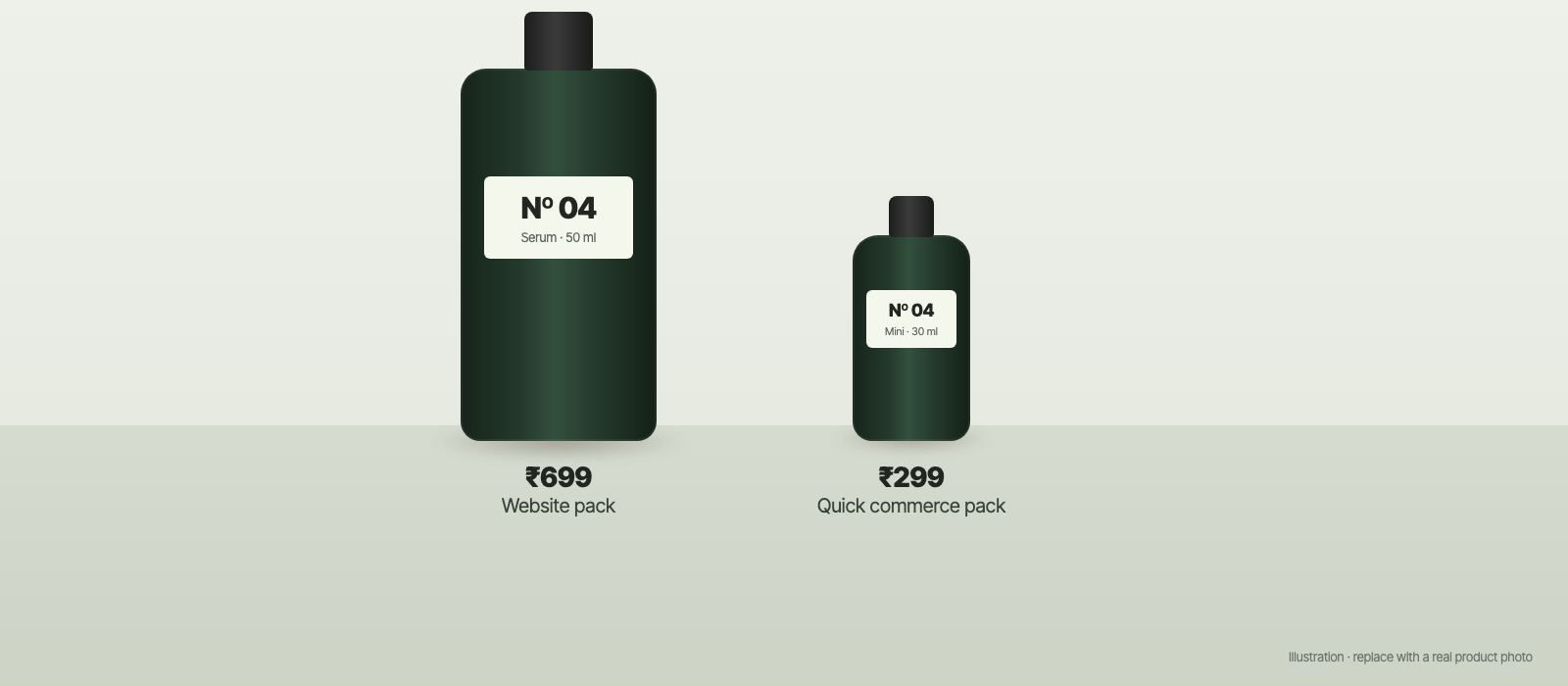
- Pack sizesA ₹1,499 jar sells on your website. On a ten-minute app, a ₹249 trial size usually moves faster.
- A price that still works after feesCommission, per-order fees and ads together can take a large share of the price.
- Packed dimensionsMeasure the packed product. Wrong dimensions are a common reason Blinkit rejects a listing.
- Shelf lifeShort-life products need smaller, more frequent shipments.
- Weekly refillsRunning out during a launch costs more than any fee.
- One price everywhereBig gaps between the apps, Amazon and your site lead to price matching or delisting.
What it costs to sell on each app
Blinkit lists what it charges for, but most of the amounts are only visible inside Seller Hub. Zepto and Instamart agree terms with each brand. Each row says where the information comes from.
| Charge | Blinkit | Zepto and Instamart |
|---|---|---|
| Sign-up | ₹0Blinkit seller pages | No public sign-up feeThird-party guides |
| Listing a product | ₹25,000 per listing request, credited to your ads wallet once approvedBlinkit seller pages | Set in your terms. Some brands report a deposit that comes back as ad credit.Third-party guides |
| Commission or margin | Depends on category and selling price; shown in Seller Hub's calculator. Guides report about 8–22%.Range from third-party guides | Agreed per brand. Guides report about 8–25% by category.Range from third-party guides |
| Per-unit and per-order fees | Inwarding, storage and fulfilment, with amounts in Seller HubBlinkit seller pages | Depends on whether you sell as a marketplace seller or on purchase ordersThird-party guides |
| Ads | Self-serve, with no fixed minimumBlinkit seller pages | Through each app's ads team or platform |
| Data | Included in Seller Hub | Zepto's brand portal is free; Zepto Atom is a paid add-onZepto's announcement |
Check your margin on one app
Fill it in once for each app, using the terms that app offers you. Inputs marked "estimate" are planning numbers; replace them with your real terms.
Fees include 18% GST. Product GST and income tax aren't included; check those with your CA. This is a planning tool, not a quote from any app.
What we do for quick commerce brands
Most of the growth on these apps comes from ads, so that's where we start. The creative and search work around them keeps the ads cheaper over time.
Choose the first app and the products
We look at your margins, where your customers live and which products sell in small baskets, then pick the app and the three to five products to launch with.
Get you onboarded
Blinkit Seller Hub setup and listings that pass review, then Zepto and Instamart applications backed by your sales numbers. We go through the commercial terms with you line by line.
Run the ads on each app
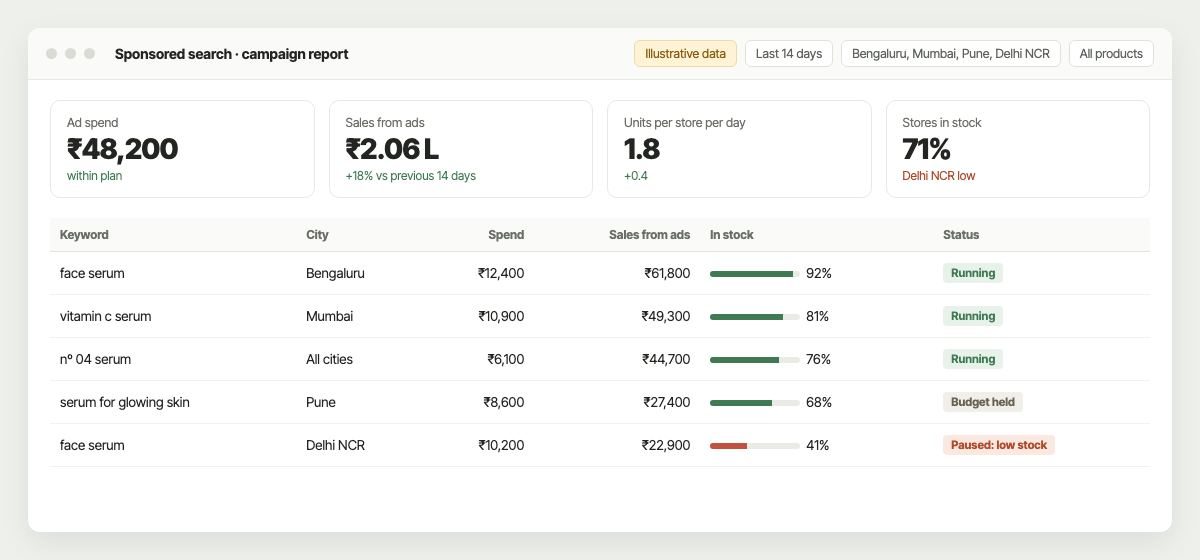
Search and category placements on the keywords that convert, paused in cities where stock runs low, with budget moved between apps according to profit after ad spend.
Make the listing and banner creative
Product images shot to each app's spec and readable at thumbnail size, titles written for in-app search, and banners for launches and sale days.
Keep you in stock
Weekly checks on stock and sales per store for every app and city, with reorders planned before availability drops.
Connect it to search and your site
People who search your brand on Google or ask an AI assistant should find the apps you're on. Every month, we report all three apps against your actual payouts.
How we run the ads
Each app gives a product more stores when it sells well in the ones it already has, so we plan ad spend around stock and sales per store, city by city.
- MONTH 1
Search placements on category and brand keywords, only in launch cities and only for products that are reliably in stock.
- MONTH 2
Move budget to the products and cities with the best sales per store. Drop products that don't sell at all without ads.
- NEXT APP
Start with the keywords and products that worked on the first app.
- MONTHLY
Set each app's and city's budget for next month from profit after ad spend. The app's reported return is only a guide.
Formats we use. Sponsored search and category placements first, then brand stores and recommendation slots once products convert, and home-screen banners for launches and sale days. Each app names these differently.
Mistakes we see often
- Launching on every app at onceStock, budget and attention get split three ways. Win one app first.
- Sending too much stock in the first shipmentStorage and expiry costs pile up. Ship what will sell in a month.
- Using website pack sizesLarge packs sit on dark-store shelves. Trial and single-use sizes sell faster.
- Judging ads by the app's reported returnIt counts sales that would have happened anyway. Track profit after ad spend for each app.
- Agreeing a margin before doing the mathsCommission, fees and ads together can pass 40% of the price. Use the calculator for each app first.
- Letting Blinkit ad credit expireIt's ₹25,000 per product and lapses after a year. Plan how to spend it from launch day.
- Advertising products that are out of stockShoppers in that area can't buy them. Tie ad budgets to availability by city.
- Pricing differently on every channelThe apps notice, and so do shoppers. Keep one price ladder across the apps, Amazon and your site.
How we work together
We agree a fixed fee before we start. Platform fees and ad spend are paid to each app directly, not through us.
Quick commerce launch
For brands going live on their first app.
- First app, hero products and pack sizes
- Your margin on that app, checked before you sign
- Registration, listings and images
- First shipment and launch cities
Launch and grow
Everything in the launch, plus the weekly work that gets you more stores and the next app.
- Ads on each app, judged on profit after ad spend
- Weekly stock, sales-per-store and complaints review
- Applications to the next app, with your numbers
- Listing, banner and brand store creative each month
- One monthly report checked against every app's payouts
Results from our D2C work
These come from D2C websites and ad accounts, not from quick commerce apps yet. We'll add quick commerce results here as client brands get through their first expansions.
Common questions
Should we start on Blinkit, Zepto or Instamart?
For most D2C brands, start on Blinkit. It's the only one of the three with a self-serve seller hub, so you can go live in about two to three weeks without waiting for a category manager, and its sales data helps your application to Zepto and Instamart later. Start elsewhere if a category manager has already invited you, or if your customers are concentrated where another app is stronger.
How do brands get on Zepto?
You apply through Zepto's brand portal, Zepto decides whether your products fit, and a category manager agrees commercial terms with you. The brand portal is free; Zepto Atom, its pin-code-level data tool, is a paid add-on. Get every fee and deduction in writing before you sign.
How do brands get on Swiggy Instamart?
By application. Instamart doesn't have open seller sign-up. Its category managers look at category fit, pack sizes, pricing and supply, then send approved brands an onboarding form with commercial terms. Sales numbers from another app make that conversation easier.
How much does it cost to sell on quick commerce?
On Blinkit it's free to register and ₹25,000 per product listing request, which comes back as ad credit. After that, every app takes a commission or margin, charges per-unit or per-order fees, and you pay for ads. Zepto and Instamart agree these with each brand. The calculator above shows your margin once you have each app's terms.
What commission do Blinkit, Zepto and Instamart charge?
None of them publishes a fixed rate card. Blinkit's commission depends on your category and selling price and shows in Seller Hub's calculator. Zepto and Instamart agree terms per brand. Third-party guides report roughly 8–25% depending on category, which is fine for early planning but not for signing.
How long does it take to go live?
About two to three weeks on Blinkit once your documents are complete. Registration finishes when your documents verify, each listing takes about seven days to approve, and stock reaches dark stores two to three days after it arrives at Blinkit's warehouse. Zepto and Instamart depend on category-manager approval, so allow several more weeks.
Do we need different pack sizes for quick commerce?
Usually, yes. Quick commerce baskets are small and often unplanned, so trial packs, single-use sizes and lower price points tend to sell faster than your website's best-value pack. Category managers also check whether your pack sizes suit their shelves.
How much should we spend on quick commerce ads?
Less than the most you can spend before a sale loses money, and only where you're in stock. Work that number out per app with the calculator, then start well below it. On Blinkit, your ₹25,000-per-product activation credit is your first ad budget.
Can you guarantee approval or rankings?
No. Each app decides on listings, onboarding and expansion. We remove the avoidable reasons for rejection and work on the numbers the apps reward: sales per store, availability and complaints.
Is quick commerce better than Amazon for a D2C brand?
They suit different purchases. Amazon is strong for planned purchases that people compare across India. Quick commerce is strong for impulse and top-up buys in big cities, delivered in minutes. Most growing D2C brands need both, with consistent pricing across them.
Talk to us about quick commerce
Tell us what you sell and where your customers are. On the call we'll suggest which app to start on, check your margin on it, and pick the products to launch.
Useful to have ready:
- Your top products, selling prices and product costs
- Where you sell today: your website, Amazon, Flipkart, shops
- Any quick commerce terms you've already been offered
Prefer to pick a time? Open the booking page